
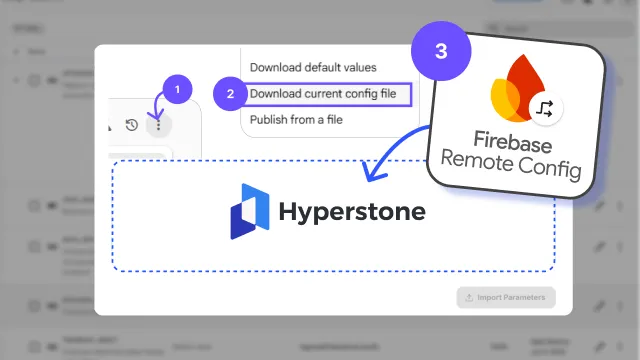
New: Migration in two clicks
We’ve added the Firebase import tool following extensive user requests. Thank you for the feedback—adding games to Hyperstone is now nearly instant. You can import your entire Firebase Remote Config without manual entry by downloading your configuration file from Firebase and uploading it to Hyperstone.
Full parity for parameters and conditions
The importer handles all data types and complex targeting logic:
- Data Types: Full support for booleans, strings, numbers, and JSON.
- Conditional Logic: Every condition moves over exactly as defined. This includes complex overrides, such as enabling a feature only for specific countries, platforms, or custom user properties.
How to migrate
You can move your entire configuration in a few seconds:
- In the Firebase Remote Config console, click the three-dot menu in the top right.
- Select Download current config file and save it to your computer.
- Go to Parameters in Hyperstone.
- Click Import from Firebase.
- Upload your file and click Import.
Your settings are now transferred, and you can start testing and optimizing your products immediately.
Stop maintaining, start optimizing
Config migration is operational overhead that slows down growth. By removing this friction, your team can shift immediately from managing static values to driving LTV. Import your current setup, set your safety boundaries, and let the algorithms find the optimal parameters for every player segment in real-time.
 LinkedIn
 Telegram
 Email
Email